
PEMDAS is a simple but powerful calculator for OS X that lets you work with equations and variables.
Note that PEMDAS App is in beta, so please send a message if you come across any issues.
Equations
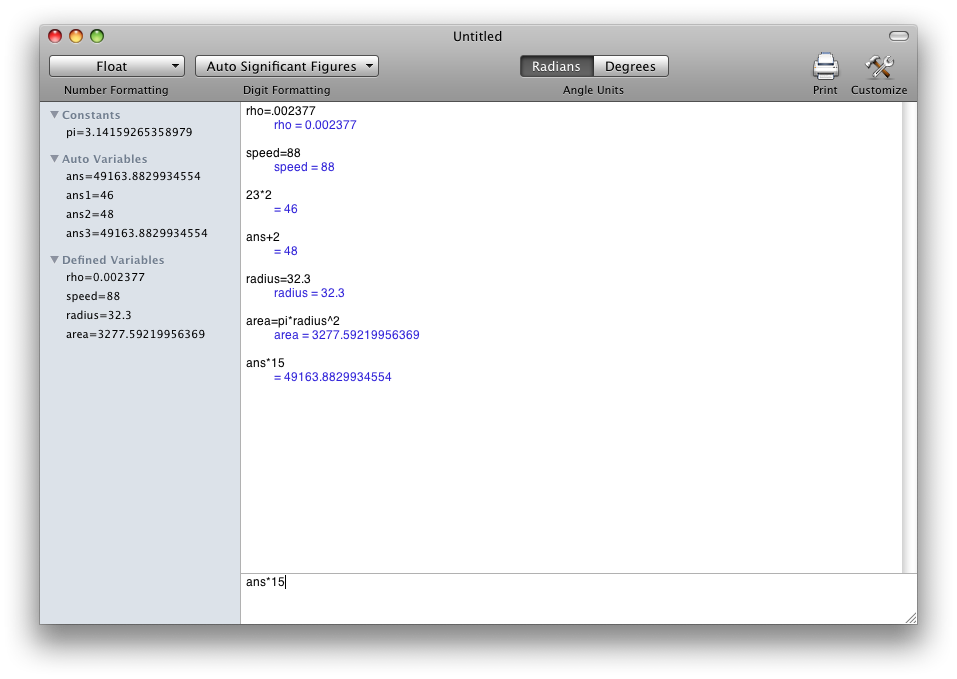
The most important feature of PEMDAS is working with equations. Simply type in an equation, hit enter, and you have the answer! Above the entry field is the equation history, where PEMDAS displays all your previous calculations.
Variable List
On the side of the application is the variable list. This lets you easily see all of the variables active in the current document.
Number Formatting
PEMDAS has several different kinds of number formatting, including float, scientific, and engineering. It also lets you specify the number of decimals or significant figures to display, and lets you add thousands separators.
Mini Mode
Click on green zoom button in the upper left hand corner of the window, and the window will resize into a much smaller window.
The Main Window
Mini Mode
The PEMDAS User Guide is distributed with the program (you can open it via the help menu). A link is also provided below: