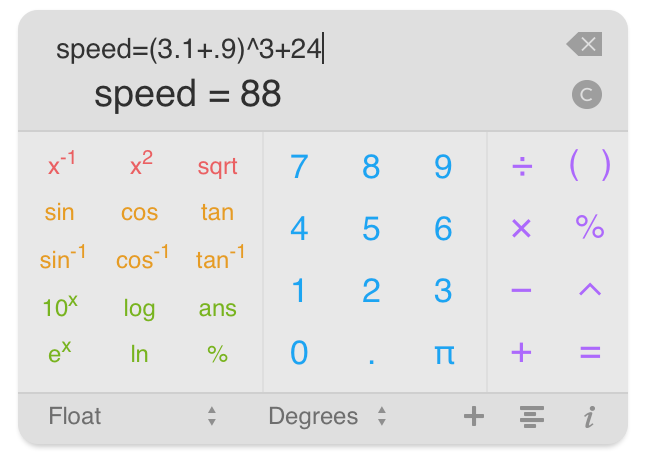

PEMDAS Widget is a simple yet powerful calculator for Dashboard in OS X.
Not only does PEMDAS Widget let you work with equations, variables, different bases, and many functions, but since it runs in Dashboard, it's lightweight and is always just a key press away.

PEMDAS now looks better than ever, especially on the latest retina Macs! The entire interface has been redone top top bottom to look good on the retina displays.
It's now easier to get in and out of miniature mode—just click the '+' button in the lower right corner of the widget!
PEMDAS Widget has many simple yet powerful features, outlined below. For more additional, in depth information, please see the documentation section.
The most importart feature of PEMDAS is that you can work with equations. Simply type in an equation, hit enter or click the equals button, and you have the result! It's a huge improvement over the frustratingly basic one-step-at-a-time calculators.
PEMDAS has several different kinds of number formatting, including float, scientific, engineering, and percent. It also lets you specify the number of decimals or significant figures to display.
PEMDAS Widget runs in Dashboard with all your other widgets, so there's no need to launch an app to do a few quick calculations -- it's always just key press or click away!
PEMDAS makes it easy to work with variables. To assign a variable, simply use the equals sign (for example: a = 2+2). Not only that, but all other calculation results are stored in an auto-defined variable (ans1, ans2, ans3, etc.), providing easy access to previous calculations.
PEMDAS keeps track of everything you've calculated in the history view (click on the button in the bottom right hard corner of the widget to go there). In the history view, you can see all the equations and results you've calculated, and can click on them to re-insert into the current equation.
If you've used PEMDAS for iOS, you'll be right at home with PEMDAS Widget (and vice versa!). Both have similar interfaces and feature sets.




To learn all about PEMDAS Widget, visit the Documentation section! The direct links to the sections are below: